LogLock: The social media blocker for musicians.
Practice first. Scroll later.
LogLock locks Instagram, TikTok and every other distraction until you've practiced your instrument. Log the session, and your apps unlock. Every session lands in a practice journal that knows what you played: pieces, scales, chords and tempo. Built for guitarists, pianists, drummers, singers and every musician who wants to play more and scroll less.
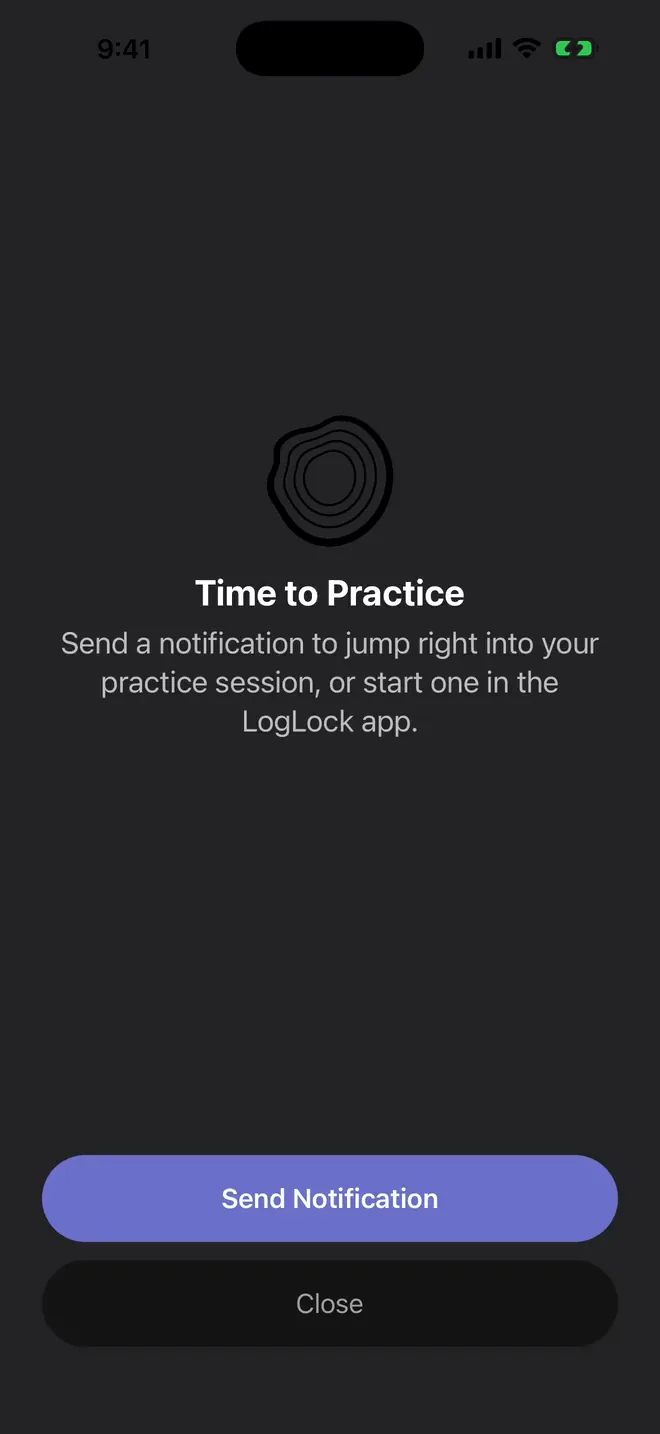
Your phone shouldn't win.
Build a daily habit that lasts
Most practice apps track what you played. LogLock makes sure you pick up your instrument in the first place: your apps stay locked until you show up.
Stay focused, not just motivated
Motivation fades. LogLock gives you a simple deal: scales, songs and etudes first, then scroll. No willpower required.
Watch your progress compound
Streaks, session history, mood trends, and a musical map that fills in as you practice. Small sessions add up to real change.
Accountability without the guilt
No shame, no lectures. Just a calm lock screen and a clear path forward: practice for a few minutes, and you're free.
Two sides of LogLock
Less scrolling. Better practice.
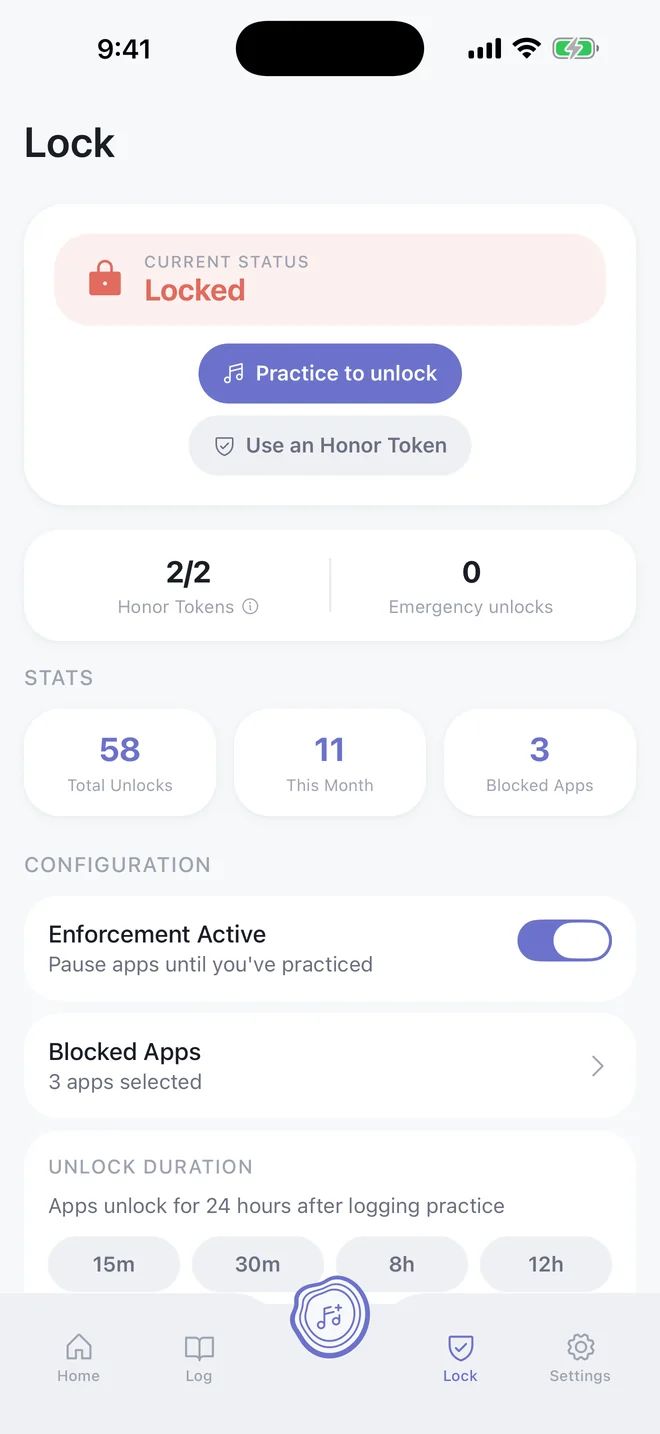
App blocker
The social media blocker built for musicians.
Instagram, TikTok, YouTube and every other distraction stay locked until you've practiced. Then your apps are back.
Practice journal
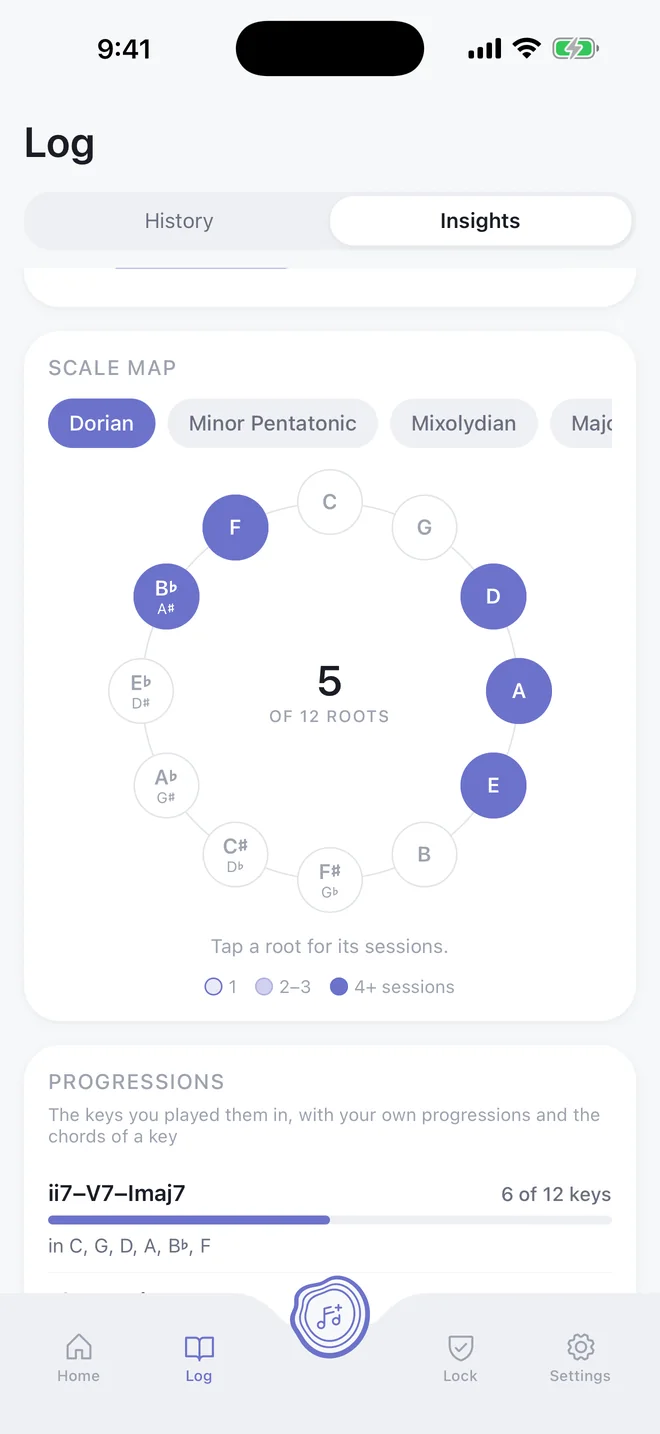
Go beyond practice time. Track what you actually play.
A detailed music practice journal: pieces, scales and chords with their roots, tempo, notes and recordings for every session.
The core loop
Everything you need. Nothing you don't.
App Blocking
Select the apps that pull you away from your instrument. They stay locked until you've reached your practice goal for the day.
How the app blocker worksPractice Journal
Log what you actually played: pieces with the part you worked on, scales and modes with their roots, chords and progressions with their key, your tempo and how it went.
Explore the music practice journalTimer Sessions
Start a live session with your intentions and a plan in segments. Notes, recorder, quick tags and metronome are one tap away. Reach your goal and your apps unlock. Of course you can keep playing.
See the practice toolsHonor Tokens
Practiced without your phone, or really need an app? Two Honor Tokens a week cover it. Stay locked after a session with “Keep me locked in” and you earn one.
How Honor Tokens workReflection and Next Time
After each session, rate mood, focus and comfort, and leave one line for next time. It becomes an intention of your next session, so you pick up where you left off.
Musical Map and Insights
See which roots you've covered for each scale on the circle of fifths, the keys of your progressions, your practice activity and your streak.
See your musical mapHow It Works
Three steps. No friction.
Choose what to block
Pick the apps that keep you from playing: Instagram, TikTok, YouTube, games. LogLock handles the rest.
Practice and log it
Play your instrument with the built-in timer running, then note what you worked on. Practiced away from your phone? Log it with an Honor Token.
Unlock and go
Once you've hit your practice goal, your apps unlock for a set window: 24 hours by default, or your own window with Pro. Rather stay focused? Keep them locked and save the unlock for later.
Features
Everything for the practice room.
Run a session with the timer and keep every tool one tap away. All of it is free, except the metronome, the looper and the AI entry.
Metronome
Set the tempo with a slider or tap it in, add subdivisions, choose which beats get the accent and pick from five click sounds, right inside your session.
Recorder
Record clips while you play and listen back later. Recordings stay on your device and are never uploaded.
Looper
Mark a start and end point in any recording and loop that passage until it sticks.
Notes and Quick Tags
Jot down thoughts during a session, saved with the minute you wrote them. Or tap a tag like Breakthrough, Needs Work or Flow State without stopping the timer.
Session Segments
Plan your session in blocks such as warm-up, technique, repertoire and cool-down. Your plan stays for next time, and you can save your own templates. A soft knock tells you when a segment ends.
Intentions
Set up to three intentions before you start: type your own or take them from your recent practice. Check them off while you play, and their cards are ready to rate when you log the session.
Say What You Practiced
After a session, type or say what you worked on, in your own words. AI turns it into cards for your pieces, scales, chords and progressions, and you check them before they go into your journal.
Live Activity
On iPhone, the running timer and your current segment sit on the Lock Screen and in the Dynamic Island. After practice, they show how long your apps stay unlocked.
Insights
Activity heatmap, everything you worked on with its tempo and how it went, key distribution, scale map, mood trends and intention completion.
Coming soon
Skill Tree
Earn XP across musical skills as you practice and see how far you've come as a player.
Tuner and Drone
Tune your instrument and practice intonation against a sustained reference tone, without leaving LogLock.
Pricing
Free to start. Pro when you want more.
The whole practice loop is free, with no time limit. Pro adds control, the metronome, the looper and the AI entry.
Free
$0
forever
Everything you need to practice first:
- App blocking until you've practiced, with 2 Honor Tokens a week
- Timer sessions with intentions, segments and your own templates
- Recorder, notes and quick tags
- Practice journal: pieces, scales, chords, progressions, tempo and reflection
- Insights, musical map and streaks
LogLock Pro
$6.99 / month
or $59.99 / year (save 28%)
Everything in Free, plus:
- Metronome inside your sessions
- Looper: repeat any passage of your recordings
- Say what you practiced, and AI fills in your journal cards
- Choose how long your apps stay unlocked, to the minute
- The timer keeps running when you leave the app, and the metronome and looper keep playing
- Create, rename and recolor your own practice types
- Settings lock: a cool-down before you can loosen your own rules
Your first 5 sessions include the metronome and the looper in the timer. Prices in USD; local prices may vary by country. Pro is an auto-renewing subscription through the App Store or Google Play and can be cancelled anytime.
FAQ
Questions musicians ask.
What is a social media blocker for musicians?
It's an app blocker built around your instrument. LogLock locks Instagram, TikTok, YouTube, games and any other app you pick until you've logged a practice session. Once you reach your practice goal, your apps unlock. You practice first, then scroll.
How does LogLock block Instagram and TikTok?
On iPhone, LogLock uses Apple's Screen Time API (iOS 16 or later), so blocked apps show a shield until you've practiced. On Android, it uses the Accessibility Service and an overlay to cover the apps you chose. You decide which apps get locked.
Does LogLock work on iPhone and Android?
Yes. LogLock is available on the App Store for iPhone and on Google Play for Android phones.
Is LogLock free?
Yes. The whole practice loop is free with no time limit: app blocking, Honor Tokens, timer sessions with segments, recorder, notes, intentions, reflection, the practice journal, insights and streaks. LogLock Pro adds the metronome, the looper, the AI entry, your own unlock window and more for $6.99 a month or $59.99 a year. Your first 5 sessions include the metronome and the looper in the timer.
Is LogLock also a music practice journal?
Yes. Every session you log becomes a journal entry with your instrument, the pieces, scales, chords and progressions you worked on, their roots and keys, tempo, notes, recordings and a short reflection. Insights show your activity, what you worked on, and a musical map of the roots you've covered.
What are Honor Tokens?
You get two Honor Tokens every week. One token logs a session you practiced without your phone, or unlocks your apps in an emergency. If you reach your practice goal and choose “Keep me locked in”, you earn a token.
Which instruments does LogLock work with?
Any instrument, and your voice: guitar, piano, drums, bass, singing, violin or anything else you practice. The loop is always the same: pick up your instrument, log the session, and your apps unlock. The journal offers techniques that fit your instrument, such as fingerpicking for guitar or paradiddles for drums.
How long do my apps stay unlocked after practicing?
24 hours by default. With LogLock Pro you choose your own unlock window, from 15 minutes to 48 hours. When it ends, your apps lock again until your next practice session.
Does LogLock use AI?
Only if you want it to. With LogLock Pro you can type or say what you practiced, and AI turns it into cards for your journal that you check before saving. It needs an account and asks for your consent first. What you type or say is sent to an AI service for this one step, and LogLock keeps no copy of it. Everything else in the app works without AI.
Do I need an account?
No. You can use LogLock without an account, and your journal stays on your phone. If you want your practice history backed up and synced, you can sign in with Apple, Google or your email address.

About
Hi, I'm Malick.
I'm a developer and a passionate guitarist, and I built LogLock for myself first.
Social media apps are designed to take as much of our time as they can. I wanted a way to limit them, and to fill that time with something I actually want to do: make music.
LogLock breaks the reflex of opening social media and turns it into practice. And because every session counts, I added practice details and reflection, so over time you draw your own musical map.
Malick, developer and guitarist
Feedback
We just launched. Tell us what you think.
LogLock is brand new, so there are no reviews here yet. We'd love to hear how your practice is going, what's missing, or what bugs you. Every message goes straight to the people who build LogLock.
Email usJump into a session.
Lock the distractions. Log the practice. Hear yourself grow.